Warm your Mac's screen down to pure red. Dim it below the keyboard's floor. Stop the backlight from flickering.
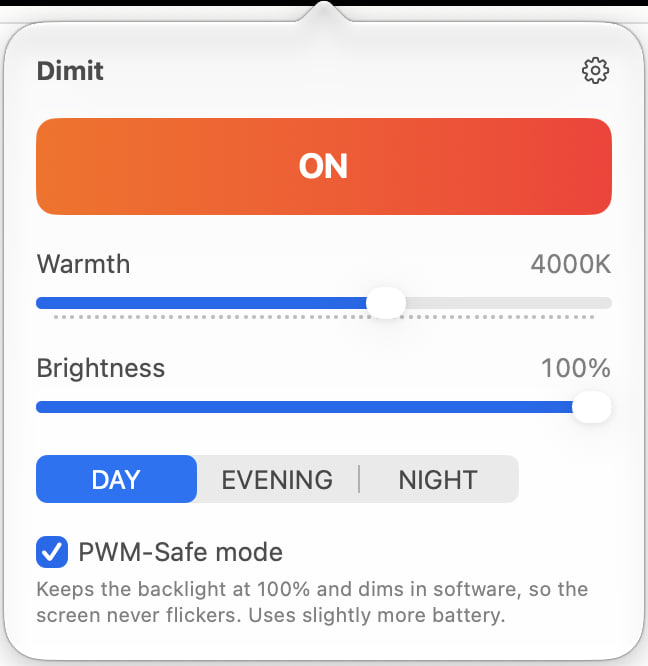
A menu-bar app for macOS. Two sliders, three presets, one button. No account, no tracking, no subscription.
Download for Mac Requires macOS 13 Ventura or later, Apple silicon or Intel. · v0.6 beta
Not notarised by Apple yet. Drag Dimit to Applications, then run this once in Terminal:
xattr -dr com.apple.quarantine /Applications/Dimit.app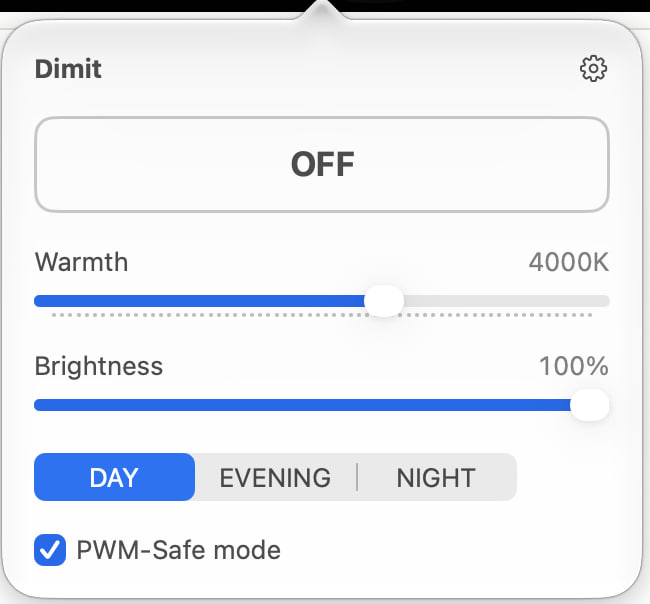
Warmth, all the way to 0K
Night Shift stops around 2500K and f.lux around 1900K. Dimit goes to a pure red \"0K\" — a name, not a physical temperature — by rewriting the display's colour tables, so the tint is applied by the graphics hardware itself.
Dimmer than the keys allow
The brightness keys stop at the panel's minimum. Dimit dims in software from 100% down to 10%, on every connected display, with one slider.
PWM-Safe mode
Many LED backlights dim by switching on and off very fast (PWM), which some people notice as flicker or strain. PWM-Safe keeps the backlight at 100% and does all dimming in software instead, so the backlight never pulses.
Screenshots stay normal
Because the tint lives in the display's colour tables, screenshots, screen recordings and screen shares show the real colours at any brightness. Verified with screenshots, QuickTime and Zoom.
Sunset to sunrise
Warms up at sunset and turns itself off at sunrise, computed on your Mac from your city or, if you allow it once, your location. Nothing is sent anywhere. Fixed times work too.
Uzbek, Russian, English
The whole app in three languages, switchable without a restart.
Install
- Open the DMG and drag Dimit to Applications.
- This beta is not notarised yet, so macOS will refuse to open it. Paste this into Terminal:
xattr -dr com.apple.quarantine /Applications/Dimit.app - Then open Dimit. It lives in the menu bar — there is no Dock icon.
If colours don’t change on macOS 26, turn off automatic brightness in System Settings → Displays — an Apple bug (FB22273730) affects some Macs. Dimming and PWM-Safe work regardless.
Free and open source (MIT). View source on GitHub · Buy me a coffee
Mac ekranini to‘liq qizil ranggacha iliqlashtiring. Klaviatura chegarasidan ham pastroq xiralashtiring. Orqa yoritish miltillashini to‘xtating.
macOS uchun menyu paneli ilovasi. Ikki slayder, uch rejim, bitta tugma. Akkaunt yo‘q, kuzatuv yo‘q, obuna yo‘q.
Mac uchun yuklab olish macOS 13 Ventura yoki undan yangisi kerak, Apple silicon yoki Intel. · v0.6 beta
Hali Apple tomonidan notarizatsiya qilinmagan. Dimit ni Applications ga sudrang, so‘ng Terminalda bir marta bajaring:
xattr -dr com.apple.quarantine /Applications/Dimit.app
Iliqlik — 0K gacha
Night Shift taxminan 2500K da, f.lux esa 1900K da to‘xtaydi. Dimit displeyning rang jadvallarini qayta yozib, to‘liq qizil «0K» gacha boradi (bu nom, fizik harorat emas) — rang o‘zgarishini grafika uskunasining o‘zi bajaradi.
Tugmalar ruxsat berganidan ham xiraroq
Yorqinlik tugmalari panelning minimumida to‘xtaydi. Dimit yorqinlikni dasturiy ravishda 100% dan 10% gacha, barcha ulangan displeylarda, bitta slayder bilan pasaytiradi.
PWM-xavfsiz rejim
Ko‘p LED orqa yoritishlar juda tez yonib-o‘chish (PWM) orqali xiralashadi; ba’zilar buni miltillash yoki charchoq sifatida sezadi. PWM-xavfsiz rejim orqa yoritishni 100% da ushlab, xiralashtirishni dasturiy bajaradi — orqa yoritish umuman pulslamaydi.
Skrinshotlar oddiy qoladi
Rang displeyning rang jadvallarida bo‘lgani uchun, istalgan yorqinlikda skrinshotlar, ekran yozuvlari va ekran ulashishlari haqiqiy ranglarni ko‘rsatadi. Skrinshot, QuickTime va Zoom bilan tekshirilgan.
Quyosh botishidan chiqishigacha
Quyosh botganda iliqlashadi, chiqqanda o‘zini o‘chiradi — shahringiz yoki (bir marta ruxsat bersangiz) joylashuvingiz asosida Mac’ingizning o‘zida hisoblanadi. Hech narsa hech qayerga yuborilmaydi. Belgilangan vaqtlar ham ishlaydi.
O‘zbek, rus, ingliz
Butun ilova uch tilda, qayta ishga tushirmasdan almashtiriladi.
O‘rnatish
- DMG faylni oching va Dimit ni Applications ga sudrang.
- Bu beta hali notarizatsiya qilinmagan, shuning uchun macOS uni ochishdan bosh tortadi. Terminalga buni joylashtiring:
xattr -dr com.apple.quarantine /Applications/Dimit.app - So‘ng Dimit ni oching. U menyu panelida turadi — Dock belgisi yo‘q.
macOS 26 da ranglar o‘zgarmasa, Tizim sozlamalari → Displeylar bo‘limida avtomatik yorqinlikni o‘chiring — Apple xatosi (FB22273730) ba’zi Mac’larga ta’sir qiladi. Xiralashtirish va PWM-xavfsiz rejim baribir ishlaydi.
Bepul va ochiq kodli (MIT). GitHub’da manba kodi · Menga qahva oling
Сделайте экран Mac тёплым вплоть до чистого красного. Затемните ниже предела клавиш. Остановите мерцание подсветки.
Приложение для строки меню macOS. Два ползунка, три режима, одна кнопка. Без аккаунта, без слежки, без подписки.
Скачать для Mac Требуется macOS 13 Ventura или новее, Apple silicon или Intel. · v0.6 бета
Пока не нотаризовано Apple. Перетащите Dimit в Applications, затем один раз выполните в Терминале:
xattr -dr com.apple.quarantine /Applications/Dimit.app
Теплота — до 0K
Night Shift останавливается около 2500K, f.lux — около 1900K. Dimit доходит до чистого красного «0K» (это название, а не физическая температура), переписывая цветовые таблицы дисплея, так что оттенок накладывает сама графическая система.
Темнее, чем позволяют клавиши
Клавиши яркости упираются в минимум панели. Dimit затемняет программно от 100% до 10%, на каждом подключённом дисплее, одним ползунком.
Режим без мерцания (PWM)
Многие LED-подсветки затемняются, очень быстро включаясь и выключаясь (ШИМ, PWM); некоторые воспринимают это как мерцание или напряжение. Режим без мерцания держит подсветку на 100% и затемняет программно — подсветка не пульсирует.
Скриншоты остаются обычными
Оттенок живёт в цветовых таблицах дисплея, поэтому скриншоты, записи экрана и демонстрация экрана показывают настоящие цвета при любой яркости. Проверено скриншотами, QuickTime и Zoom.
От заката до рассвета
Теплеет на закате и выключается на рассвете — вычисляется на вашем Mac по городу или, если вы один раз разрешите, по местоположению. Ничего никуда не отправляется. Заданное время тоже работает.
Узбекский, русский, английский
Всё приложение на трёх языках, переключение без перезапуска.
Установка
- Откройте DMG и перетащите Dimit в Applications.
- Эта бета ещё не нотаризована, поэтому macOS откажется её открыть. Вставьте это в Терминал:
xattr -dr com.apple.quarantine /Applications/Dimit.app - Затем откройте Dimit. Он живёт в строке меню — значка в Dock нет.
Если на macOS 26 цвета не меняются, отключите автояркость в Системных настройках → Дисплеи — ошибка Apple (FB22273730) затрагивает некоторые Mac. Затемнение и режим без мерцания работают в любом случае.
Бесплатно и с открытым кодом (MIT). Исходный код на GitHub · Купить мне кофе